

The Best USB Microphones
Your Ultimate Guide to the Best USB Microphones
Recording from your laptop’s built-in microphone may work in non-professional settings, but it simply won’t do if you want to produce good-quality audio. Too often, these microphones pick up too much background noise and make your voice sound fuzzy or muted. They can also pick up static and air-popping sounds because they normally have no wind filter. It goes without saying that recording music or videos on your built-in mic could spell disaster.
This brings us to the point of this guide. If you want to enhance your audio output quality without wasting too much time on learning how to set up an entire sound system, worry not. Universal Serial Bus or USB microphones are perfect because all you have to do is plug the USB cables into your computer, cellphone, or iPad, and you’re done.
The ease and utility of mics with USB output have made them more popular than ever, especially among individual content creators, so it’s no surprise that they are everywhere. Take a look at our guide on the top USB microphones to find out which of these are worth investing in.
Which is the Top USB Microphone?
- 8 microphones compared on the same points
- No brand pays to appear or to rank higher
- Updated when models change or are discontinued
Our top picks
Editor’s choice
Best Overall
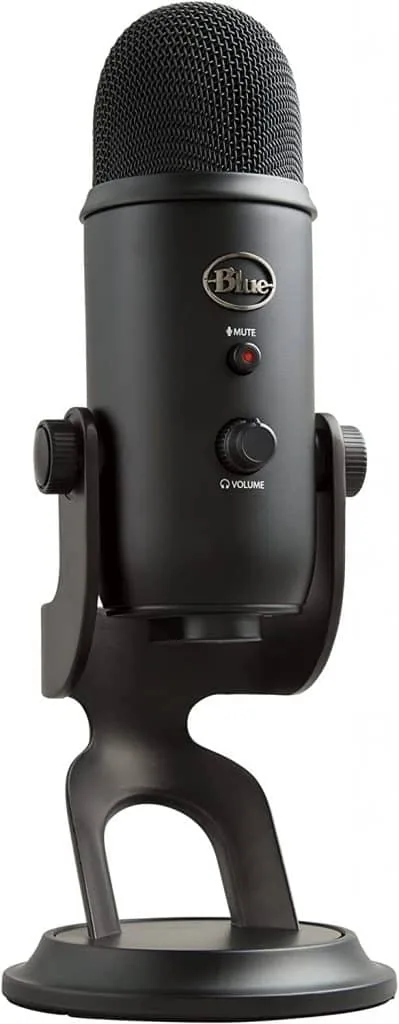
Blue Yeti
The Blue Yeti is the classic and best mic in terms of price, quality, and mic sensitivity that professionals and amateurs can work with.
$99.99
List price $139.99
Save 29%
Best Hybrid
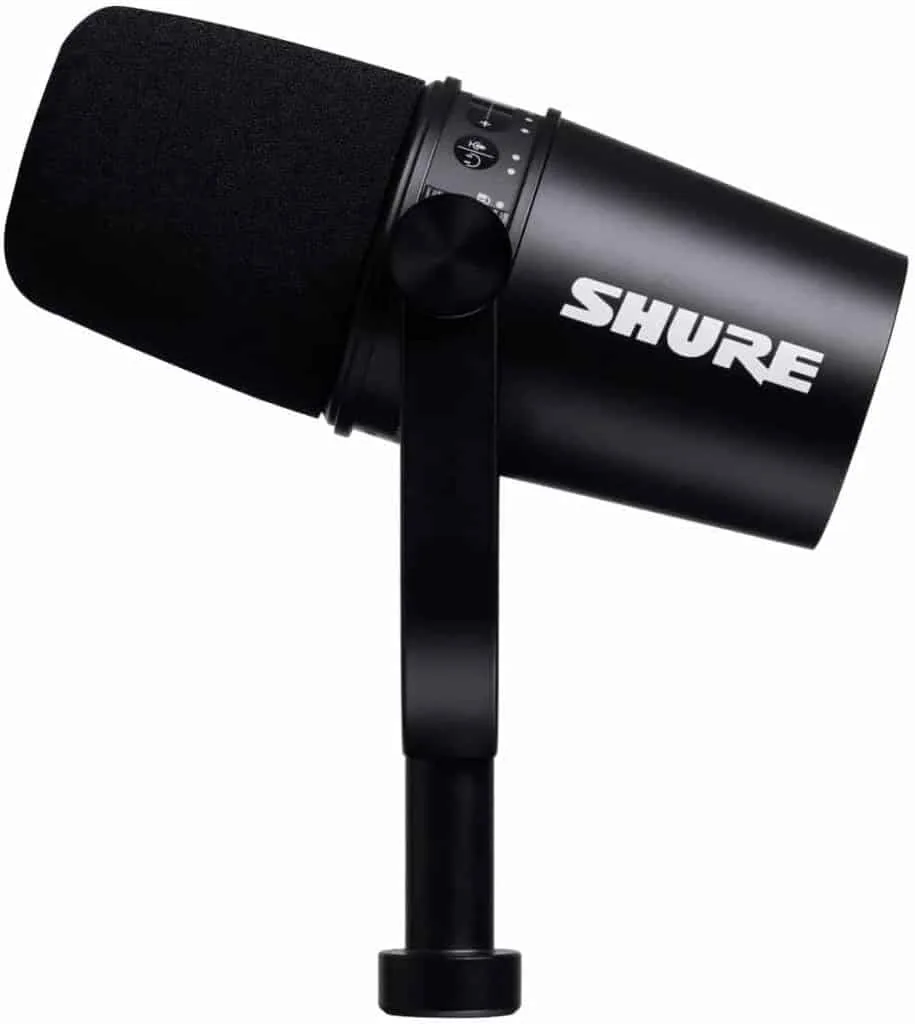
Shure MV7
The Shure MV7 combines multiple mics into one device with the ability to function as both USB and XLR mics.
Best Premium
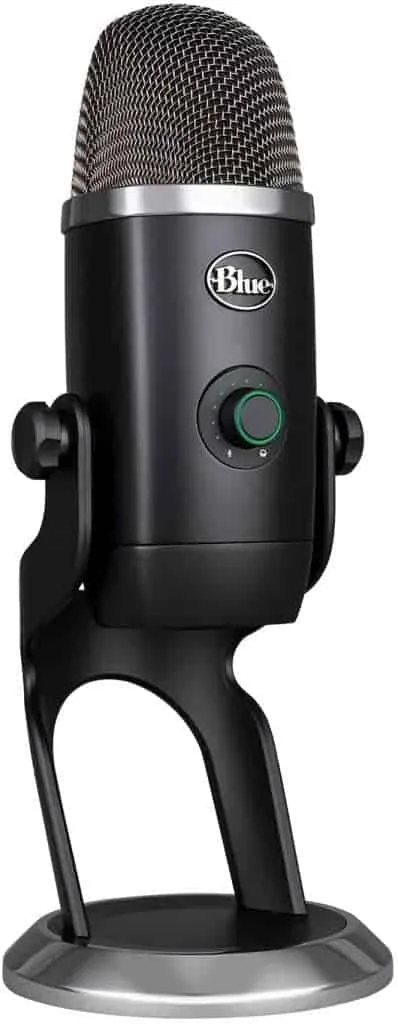
Blue Yeti X
The Blue Yeti X delivers simplicity in design but quality audio results for a variety of recording applications.
$159.99
See the alternative Opens in a new tab
No longer on Amazon. Our alternative: Logitech G Blue Yeti 2 USB Mic
Compared at a glance
| Photo | Model | Best for | Highlights | Buy |
|---|---|---|---|---|
| Blue Yeti | Best Overall | — |
Check price
$99.99
List price |
|
| Shure MV7 | Best Hybrid | Has both USB and XLR output |
Check price
$299.00 |
|
| Blue Yeti X | Best Premium | Decent sound performance |
See alternative
No longer on Amazon. Our alternative: Logitech G Blue Yeti 2 USB Mic $159.99 |
|
| Blue Yeti Nano | — | — |
Check price
$79.99
List price |
|
| HyperX QuadCast S | — | Multiple recording patterns |
See alternative
No longer on Amazon. Our alternative: HyperX QuadCast 2 S
$149.00
List price |
|
| Elgato Wave:3 | — | Broadcast-grade sound performance |
Check price
$97.00 |
|
| Audio-Technica ATR2100-USB | — | Sounds great |
See alternative
No longer on Amazon. Our alternative: Audio-Technica AT2005USB Cardioid Dynamic USB/XLR Microphone $79.00 |
|
| Maono HD300T USB/XLR Dynamic Broadcast Microphone | — | — |
Check price
$59.70
List price |
Every pick reviewed
#1 Best Overall
Blue Yeti
Sound Quality: ⭐ ⭐ ⭐ ⭐ ⭐
Design: ⭐ ⭐ ⭐ ⭐ ⭐
Features: ⭐ ⭐ ⭐ ⭐
A classic for a reason, the Blue Yeti Microphone is our choice for the top USB microphone. Despite being one of the brand’s older models, the Yeti mic manages to wow us and pretty much blow other USB microphones out of the water in terms of sound profile, output, and sensitivity.
The design is classic, too. You’ll find it comes with a sturdy build as well as a robust little mic stand mount perfect for propping onto a desk or other flat surfaces.
Thanks to its wide frequency response, the mic can capture human voice without having to position the capsule close to your mouth. It can also block out ambient noise successfully.
The Yeti has physical controls on the mic itself, including an instant mute button, a volume dial, a volume knob for headphones, a gain control knob, and pickup pattern switches that allow you to move from one polar pattern to another.
The last one, in particular, is something we want to emphasize: the Yeti features four recording patterns, namely cardioid, omnidirectional, stereo, and bidirectional, which offers users the option to switch between different recording styles depending on the application.
Cardioid patterns are perfect for single-subject recordings; in this setting, the studio mic picks up sound from the front and side of the capsule. This makes it a great microphone for video conferencing.
Furthermore, the Yeti comes with a boom arm that can clamp to a chair, table, desk, or any other surface. It also includes additional equipment such as a shock mount, pop shield, and a basic desktop stand, making recording easy for anyone.
$99.99
List price $139.99
Save 29%
Check price on Amazon Opens in a new tab · we may earn a commission
#2 Best Hybrid
Shure MV7
Sound Quality: ⭐ ⭐ ⭐ ⭐
Design: ⭐ ⭐ ⭐ ⭐ ⭐
Features: ⭐ ⭐ ⭐ ⭐
The next on our list is considered a classic in many audio circles. Known for its bright, radio-friendly sound, the Shure MV7 is technically a USB/XLR hybrid rather than a discrete USB microphone.
Technicalities aside, the Shure MV7 is a beautiful device that is able to recreate the natural warmth and tones distinct to the human voice. The Shure MV7 is the more beginner-friendly version of some of Shure’s more iconic models, the SM7B and SM58, which have been used for decades in radio shows and by vocalists.
The Shure MV7 has a few key differences. For one, it’s a lot more compact. It’s also a little limited because it is meant for those at the tail-end of beginner recording.
That said, the Shure MV7 is one of the best mics anyone could make if they want to prioritize sound quality in whatever they do, whether it’s streaming or creating YouTube content. It’s also regarded as the best one to use for meetings.
This mic is equipped with a gain control knob and a headphone port. Another huge advantage of the Shure MV7 is the app that comes with it. The MOTIV app lets you tweak your vocals, adding sparkle or depth according to your needs.
What we like
- Has both USB and XLR output
- Has a touch panel for gain control
- Highly versatile
What we don’t
- Windscreen may be loose
$299.00
Check price on Amazon Opens in a new tab · we may earn a commission
#3 Best Premium
Blue Yeti X
Sound Quality: ⭐ ⭐ ⭐ ⭐
Design: ⭐ ⭐ ⭐ ⭐
Features: ⭐ ⭐ ⭐ ⭐
Want a larger microphone that works well in a variety of recording applications? The Yeti X is the older (and bigger) sibling of the Nano and Yeti classic, standing 12 inches tall and weighing 2.8 lbs – its size may be a con for some, but a huge pro for others.
For one thing, having a larger capsule means your mic will be positioned closer to your mouth, which helps with vocal emphasis and muting room sounds.
Size aside, the microphone performs really well. The sound profile is simple and clean. Users can choose between four different recording modes depending on the type of recording they want to achieve, much like the Yeti classic version.
To get a little technical, the microphone has an output of 24-bit/48kHz. All of these combined make the Yeti X one of the top mics and most well-rounded options out there no matter what level you’re at.
We were also able to significantly tweak the audio samples using the software that came with the mic – perfect for adding a little sparkle to one’s vocals. If you’re thinking about getting the Yeti Pro but find that it’s a bit too bulky, then the Yeti X is a good alternative as it’s narrower by 15mm and has 12.35% less body volume.
What we like
- Decent sound performance
- Included G Hub and Blue VO!CE Software
- Switchable patterns
- Built-in shockmount and stand
- Headphones compatible
What we don’t
- Pop filter and Compass Boom Arm are sold separately
- High-pass filter can still be improved on
#4
Blue Yeti Nano
Sound Quality: ⭐ ⭐ ⭐ ⭐
Design: ⭐ ⭐ ⭐ ⭐
Features: ⭐ ⭐ ⭐ ⭐
If you want style, portability, and great-sounding audio rolled into one, the Blue Yeti Nano is what you should buy, particularly if you’re hesitant to splurge. At under $100, the Blue Yeti’s younger sibling is a mic that has the best value for money as it packs multiple features that make it ideal for budding content creators, streamers, and podcasters.
After all, the top USB mics are also ones that don’t break the bank while still giving you more than you paid for.
The Yeti Nano has two distinct microphone polar patterns or recording modes, cardioid and omnidirectional, which can be accessed through the microphone’s software.
The cardioid recording mode of the Yeti Nano is perfect for delivering full-bodied and natural tones from a single speaker while the omnidirectional pattern makes recording and speaking to a group of people easier than ever.
Despite standing only 8 inches tall, the Yeti Nano looks incredible and sleek, designed with a robust casing that can withstand wear and tear. Its size makes handling the mic easy, and if needed, one can place it inside a bag and take it to the office, a studio, or a cafe.
$79.99
List price $119.99
Save 33%
Check price on Amazon Opens in a new tab · we may earn a commission
#5
HyperX QuadCast S
Sound Quality: ⭐ ⭐ ⭐ ⭐
Design: ⭐ ⭐ ⭐ ⭐
Features: ⭐ ⭐ ⭐ ⭐ ⭐
Gaming aesthetics have evolved over the past few years, but RGB-themed equipment seems to be a trend that’s not going anywhere anytime soon (no, really, try to find a streamer on Twitch that doesn’t have RGB backlit equipment). That said, the HyperX QuadCast S is the only mic in this list that has an RGB feature.
But aesthetics are not the only reason gamers seem to gravitate towards the HyperX QuadCast S, an all-metal and satin-black encased microphone, though design is a huge part of its charm.
With such a gamer-centric design, one might ask, “Will this USB mic work with gaming consoles?”, and the answer is yes! The mic is compatible with gaming consoles, including the PlayStation 4, PlayStation 5, Xbox, PC, and Mac. It’s also Discord and TeamSpeak certified, making the device perfect for multiplayer voice chats.
If you want to further maximize the HyperX QuadCast S, then you can also download HyperX’s Ngenuity software. This software will allow you to adjust headphone volume controls, microphone volume, and monitoring volume. You can even play around with the RGB lights using said software!
Unfortunately, this mic is a little expensive for beginners/hobbyists, which you might realize by now is the largest and most profitable market for USB mics. So, if going professional is something in your horizons, then we recommend putting your money towards something with an XLR output cable or at least a hybrid if convenience is non-negotiable.
That said, the QuadCast S is by no means a bad mic, as its advantages make it a worthy option. Its sleek design can add visual excitement to any video, and as for its performance, the microphone offers four standard polar patterns for capturing natural-sounding vocal tones.
Experts and users rave about its audio reproduction quality with good reason. If you want a stylish yet high-quality gaming setup, the QuadCast S should be your first option. It’s also one of the best standalone mics out there.
What we like
- Multiple recording patterns
- Built-in shock mount and stand
- LED lights and RGB lights can be customized via the HyperX NGENUITY software
- Tap-to-mute feature
- Certified by Discord and TeamSpeak
What we don’t
- Internal pop filter can be more effective
#6
Elgato Wave:3
Sound Quality: ⭐ ⭐ ⭐ ⭐
Design: ⭐ ⭐ ⭐ ⭐ ⭐
Features: ⭐ ⭐ ⭐ ⭐
If you’re thinking of getting the QuadCast S but aren’t sold on its price tag, then the Elgato Wave:3 might be just what you need. Like the QuadCast S, the Wave:3 is designed with streamers in mind, although it has no shortage of uses outside the realm of gaming content creation.
The Elgato Wave:3 is a first for the brand that wasn’t always known for its audio recording equipment. However, despite this being their earliest foray into USB mics, you can’t really tell and it has earned its right to be hailed as one of the top USB mics currently out there. Everything from the sleek matte black casing to the physical controls on the mic is solid, classic, and robust.
This is also a condenser microphone, which is typically more sensitive than dynamic microphones in its ability to pick up even the smallest background noise. The good news is that this condenser microphone in particular has uncanny vocal replication capabilities without being too sensitive.
And while the Wave:3 doesn’t have the four standard pickup patterns available, it makes up for it with a high frame rate. Recording at 24-bit/96kHz, audio recordings made with the Wave:3 are flexible and easy to manipulate without distortion.
Speaking of editing, the Wave Link software by Elgato is a huge advantage that not many other mics have. The software serves as an audio editor as well as a digital mixer that can work with multiple mic recordings from separate audio sources.
What we like
- Broadcast-grade sound performance
- Uncomplicated dials and button
- Wavelink Software
- Clipguard technology
- Lightweight and simple design
What we don’t
- Plastic mount in weighted metal stand feels flimsy
- Has only one polar pattern
$97.00
Check price on Amazon Opens in a new tab · we may earn a commission
#7
Audio-Technica ATR2100-USB
Sound Quality: ⭐ ⭐ ⭐ ⭐
Design: ⭐ ⭐ ⭐ ⭐
Features: ⭐ ⭐ ⭐ ⭐
An entry-level mic perfect for beginners, the Audio-Technica ATR2100 is a mic that’s up to par with many professional mics in the market. Equipped with both USB and XLR outputs, this mic is highly versatile and convenient, offering great sound quality even with its compact size.
With its cardioid pattern, the ATR2100 can reduce the pickup of unwanted sounds such as keyboard clicks, and can also reduce background noise. This mic delivers well in vocal applications and allows anyone to monitor themselves with its built-in headphone port. You can also use the port to test any pair of headphones directly.
The mic also has easy-to-use controls on the bottom, allowing users to adjust the headphone and mic sound levels on the spot. The on/off switch of the ATR2100 microphone also doubles as a mute button, how cool is that? Additionally, the ATR2100 comes with a desktop stand for convenient use with your computer.
What we like
- Sounds great
- Dual outputs of USB and XLR
- Includes multiple accessories
- Can be used for multiple sound applications
What we don’t
- Needs a bigger mic stand for live and stage applications
- Quite pricey for an entry-level microphone
#8
Maono HD300T USB/XLR Dynamic Broadcast Microphone
Sound Quality: ⭐ ⭐ ⭐ ⭐
Design: ⭐ ⭐ ⭐
Features: ⭐ ⭐ ⭐ ⭐
The Maono HD300T is a dynamic mic that brings USB and XLR connectivity in one package. The HD300T can deliver excellent audio that’s smooth and undistorted and for a reasonable price, too.
Inside this dynamic mic is a cardioid capsule that captures sound in front. It produces broadcast-quality audio that’s comparable to higher-end mics, making it ideal for radios, studios, recordings, vocals, podcasts, content creation, and much more.
It also has a headphone output for direct monitoring while recording without any delay or echo. Additionally, the HD300T also has control buttons to adjust the headphone output volume conveniently.
Maono has packed a shock mount and a pop shield to reduce plosives and noise during your recording session.
$59.70
List price $65.98
Save 10%
Check price on Amazon Opens in a new tab · we may earn a commission
So, which one should you buy?
Final Note
While choosing the best microphone will primarily rely on a person’s preference, applications, and budget, having a guide to help in determining what makes such a device a great microphone is handy. Having said that, if you are looking for a portable plug-and-play microphone that is generally not as expensive as other microphones but can still produce great sound quality and overall decent quality of audio, then a USB mic is the best choice for you!
Frequently Asked Questions
Are USB Mics Any Good?
There is a misconception that USB mics are third-class citizens in the world of recording audio, and that simply isn’t true. The finest USB mics offer versatility, natural vocal output, and ease of use, often without costing as much as other mic types.
USB mics are great at picking up and emphasizing vocals while muting room noise. They’re certainly a step up from built-in computer microphones and can even go head-to-head with mics that require a separate interface.
What is the Difference Between a USB Mic and a Regular Mic?
Mics using a USB connection are essentially plug-and-play. This is because they have a built-in audio interface and preamp which allows users to simply plug in their microphone to a computer and start recording.
The main benefit of a USB microphone over an XLR mic is the setup’s ease. An XLR setup tends to be a little more complicated because XLR microphones require the use of an audio interface with onboard controls. They also have separate channels so that the sounds don’t interfere with one another.
On the other hand, with a USB microphone, all you have to do is plug the included cable, either a USB-A or a USB-C cable, into your computer or phone. There are USB interfaces available as well if you want more control over your audio for better sound but generally, USB-type mics don’t require the use of one.
Most of these mics will have onboard controls on the microphone itself. You’ll often find a mute button, a volume control knob, a knob for gain control, volume control for your headphones, and a pickup pattern button on the interface. USB port types will vary depending on the mic, and they’re usually mini USB, micro USB, and USB-C.
What Do You Use a USB Microphone For?
Anyone can use a USB microphone. Because of their wired nature, they are best for indoor recording applications, such as podcasting, streaming, and vlogging. Its functions usually vary with the mic’s features.
A good example is the Audio-Technica Cardioid Condenser mic. Because it has an onboard headphone port, a cardioid pickup pattern, an internal headphone amplifier, and an analog-to-digital converter, many regard the USB Audio-Technica as a streaming-focused mic. The headphone jack allows users to record headphone output.
In our list of the finest USB mics, you’ll find that their main function will vary but all of them can be used in multiple applications.
Can You Use a USB Mic for Studio Recording?
Generally, regular microphones are better for a studio recording environment as having audio interfaces allows an audio engineer to tweak recording devices better. But that’s not to say mics with USB connectivity, especially premium ones, are completely ruled out for studio sessions.
In fact, most USB mics have excellent recording quality, frequency response, and higher sound pressure levels that make them excellent studio performers. The top USB mics are often great for studio sessions especially because they usually have various pickup patterns in one mic, letting you set up a few presets for simpler use.
Is a USB Microphone for Singing?
Yes, USB microphones work for singing. Some of the leading USB mics are condenser mics, which are great for picking up subtle sounds thus enhancing your recording quality.
Additionally, most mics with USB connectivity come with multiple pickup patterns and recording capabilities, which are an advantage over many XLR microphones. The Yeti, for example, is an industry-standard mic that has both a cardioid recording pattern and omnidirectional capabilities.
The cardioid mode can allow you to focus on recording voice, while an omnidirectional pattern records sound from all ends of the mic, which is ideal for capturing multiple instruments at once.
How Much Does a Good USB Mic Cost?
The truth is, there are plenty of reliable USB microphones at almost every price point. Don’t let people fool you into thinking only the expensive ones are worth buying. But if you’re looking for something that can go head-to-head with professional content creators, then shelling out a little money is necessary.
Based on our research and testing, the finest USB mics are within the $90 – $200 price range, although we do feature one $50 USB microphone below.
One thing you should look at when buying a USB mic is the accessories included. An external pop filter or windscreen is a great inclusion to have. Many mics have a pop filter or shield included in the overall costs, while others require you to buy one. A pop shield can be pricey and not every filter will be compatible with your USB device. Blue microphones are great for this because they also sell pop filters.
Other handy features include a desktop mic stand, shock mount, micro USB compatibility, and a Type C connection, all of which can turn a decent microphone into a great one based on functionality alone.
Is USB-C Better for Microphone?
Compared to USB-A or micro USB, USB-C is the much better connectivity option when it comes to USB-type mics. This is because the use of USB-C has become the standard in recent years due to its reversible design, fast charging ability, and the capability to transmit data at high speed. Many modern devices use USB-C, including smartphones, laptops, tablets, and even some interfaces.
When selecting a USB-type mic, make sure to get one that has a USB-C port to get high-quality audio recordings.
What Is the Downside of a USB Mic?
The downside of a USB-type mic is that it typically offers less flexibility and upgrade potential compared to a traditional XLR-type mic. USB-type microphones have built-in analog-to-digital converters, which means you’re limited to the quality of the internal components and can’t easily upgrade your setup.
Additionally, USB-type microphones usually connect directly to a computer, which can introduce latency issues or limit compatibility with professional audio equipment like mixers and audio interfaces. While they are convenient and offer good recording quality, microphones with USB connectivity might not meet the needs of more advanced users who require higher-end audio processing and the ability to customize their recording setup.
What is the best USB-type mic on the market?
The Blue Mics series is one of the leading USB mics out there. Trusted by professional musicians and amateurs alike due to their crisp audio, consumer-oriented design, overall solid build, convenient portability, and a price tag that won’t break the bank, the Blue Mics series is at the top of the list for many.
What is the best USB-type microphone for recording vocals?
While most USB microphones are designed more for speech applications rather than vocal or instruments, there are those that have audio settings and mic gain that can take on the task. Some of those are the Elgato Wave:3, Shure MV7, and the Blue Yeti Pro, which are included in this list.
One USB mic that’s not on the list though is the Røde NT-USB Mini. The Røde NT-USB Mini has impressive audio engineering and design sensibility that many creatives can attest to. With a cardioid pattern that will block out unnecessary noise and a frequency response of 20-20,000 Hz, this microphone can churn out crisp audio without any hiss or white noise pickup.
However, this mic is quite sensitive so it’s best to invest even in just a standard mic stand and a shock mount when using this so as not to pick up any nuisance noises.
Another mic that you can look into is the AKG Lyra. This mic is ready to use right away and comes with its own desk stand. It is flexible, offering four pickup patterns for any kind of recording.
What USB microphone has the best audio quality?
While all the USB microphones found in this list have professional-quality audio, one mic that stands out the most is the Blue Yeti. It is hailed by plenty of content creators and users as the best overall due to its audio quality, build, design, features, and price tag. However, it’s still best for you to test USB microphones as the quality can differ due to preference and intended application.
There are also models that make use of digital signal processing so it can definitely affect the quality of the track, may it be a pre-recorded audio or a live one.
Is a USB or jack better for a microphone?
There isn’t a general consensus on this quality-wise, so you should pick a connectivity mode that works best for the equipment that you already have. If you’re using an audio interface, go for a microphone with a 3.5mm wire. If you prefer digital recording, go for a USB mic.
Will a USB mic work with both a PC and a Mac?
Any USB mic can connect directly to a computer with a USB port compatible between your devices. Compatibility issues may arise when it comes to software, however, especially when it comes to gaming mics. More often than not, gaming mic software is only available on Windows computers and not Macs.