Blue Yeti vs HyperX QuadCast for Streaming: Which USB Microphone Is Better?
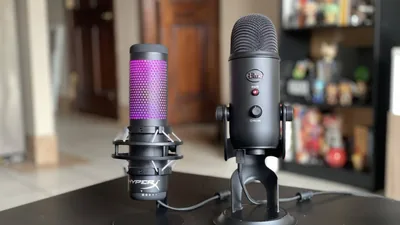
The Blue Yeti and HyperX QuadCast have earned their reputations as two of the best USB microphones for creators who want high-quality audio without investing in an XLR setup. Both deliver clear, detailed recordings, offer multiple polar patterns, and connect directly to your computer, making them accessible to beginners while still satisfying experienced creators.
Despite these similarities, they’re designed with different priorities in mind. The Blue Yeti aims to be a versatile microphone for many types of content creation, while the HyperX QuadCast focuses on making live streaming as simple and reliable as possible.
The best choice depends less on technical specifications and more on how you plan to use the microphone every day.
Who Each Microphone Is For
The Blue Yeti is best suited for creators who produce a variety of content. If your schedule includes livestreams, podcasts, YouTube videos, voiceovers, interviews, or online classes, its versatility makes it a strong long-term investment. The microphone’s multiple recording patterns allow it to adapt to different recording situations without requiring additional hardware.
The HyperX QuadCast is designed primarily for gamers and streamers. Nearly every aspect of its design, from the integrated shock mount to the tap-to-mute sensor, is intended to solve common problems that occur during live broadcasts. If streaming is your primary activity, the QuadCast offers features you’ll likely use every session.
For someone purchasing their first USB microphone exclusively for Twitch or YouTube Gaming, the HyperX QuadCast generally feels more purpose-built. For creators whose content extends beyond streaming, the Blue Yeti offers greater flexibility.
Real-World Performance
Streaming
For live streaming, the HyperX QuadCast has a slight advantage because of its practical hardware features. The built-in anti-vibration shock mount helps reduce desk bumps that often occur during gaming, while the capacitive tap-to-mute button allows you to instantly mute yourself without fumbling for controls.
The integrated LED indicator also makes it obvious if your microphone is live, reducing the chances of accidentally talking while muted. Its brighter sound profile also helps speech cut through gameplay audio, making it easier for viewers to understand commentary during fast-paced streams.
The Blue Yeti performs extremely well for streaming too, but it often benefits from a boom arm or aftermarket shock mount to minimize vibrations. Without these accessories, it can pick up more desk noise than the QuadCast.
Winner for streaming: HyperX QuadCast.
Podcasting
Podcast recording places greater emphasis on vocal richness than on convenience features.
The Blue Yeti naturally produces a warmer, fuller sound that many podcasters appreciate. Voices tend to sound polished immediately after recording, often requiring only light equalization before publishing.
The HyperX QuadCast delivers excellent clarity but has a brighter tonal balance. Some creators enjoy this extra articulation, while others prefer the more broadcast-like character of the Blue Yeti.
If podcasting is a regular part of your workflow, the Blue Yeti generally provides a more pleasing starting point.
Winner for podcasting: Blue Yeti.
Vocals and Voiceovers
For voiceovers, narration, online courses, and YouTube videos, both microphones perform exceptionally well, but they emphasize different qualities.
The Blue Yeti captures more body and warmth, making voices sound larger and more cinematic. This character works particularly well for storytelling, educational content, and long-form narration.
The HyperX QuadCast emphasizes clarity. Consonants sound more pronounced, helping dialogue remain understandable without extensive processing. This makes it especially suitable for livestreams where viewers are listening alongside game audio or background music.
Neither microphone is objectively superior. Your voice plays a major role in determining which sound profile works best.
Sound Profile Breakdown
Although both microphones use condenser capsules, they produce noticeably different recordings.
The Blue Yeti has a warmer frequency response with stronger low-mid frequencies. This gives voices more weight and depth, but it can also make naturally deep voices sound slightly bass-heavy if the microphone is positioned too close.
The HyperX QuadCast has a brighter and more neutral presentation. High frequencies are slightly more prominent, giving speech additional clarity without sounding harsh. This tonal balance often requires less equalization for livestreaming.
Background noise performance is similar because both are condenser microphones. Neither is designed to eliminate keyboard clicks, mouse movements, or room echo. Proper microphone placement, lower gain settings, and a treated recording space remain far more important than the microphone itself.
For creators who enjoy editing audio in post-production, the Blue Yeti provides more flexibility. For creators who want great sound with minimal tweaking, the QuadCast often requires less work.
Setup and Ease of Use
Both microphones connect through USB and are recognized immediately by Windows and macOS without complicated installation procedures. The difference lies in daily usability.
The HyperX QuadCast includes several features that many streamers would otherwise purchase separately. Its integrated shock mount reduces vibrations, the tap-to-mute function simplifies stream management, and the gain control is conveniently positioned on the microphone itself.
The Blue Yeti has intuitive controls for gain, headphone volume, mute, and polar pattern selection, but its standard desktop stand transfers more vibrations than the QuadCast’s suspension system. Many owners eventually purchase a boom arm, shock mount, or pop filter to maximize performance.
If you’re building your first streaming setup, the QuadCast generally requires fewer accessories before it feels complete.
Value for Money
The Blue Yeti has remained one of the best-selling USB microphones for years because it continues to offer outstanding versatility for its price. One microphone can comfortably handle streaming, podcasting, interviews, music recording, and voiceovers, making it an excellent value for creators with diverse projects.
The HyperX QuadCast provides value in a different way. While its raw audio quality is comparable to the Blue Yeti, its integrated shock mount and streaming-focused controls reduce the need for additional purchases. For many gamers, those built-in conveniences justify the price difference.
When comparing total setup costs rather than microphone prices alone, the QuadCast often ends up being the more economical option for dedicated streamers because fewer accessories are needed. The Blue Yeti, however, offers greater long-term value if you expect your content to evolve beyond livestreaming.
Which Microphone Makes More Sense for You?
There isn’t a single winner because each microphone excels in different situations.
Choose the HyperX QuadCast if your primary focus is live streaming, gaming, or creating content where ease of use matters as much as sound quality. Its built-in shock mount, tap-to-mute sensor, and bright vocal presentation make it one of the most convenient USB microphones available for streamers.
Choose the Blue Yeti if you create multiple types of content beyond livestreaming. Its warmer sound signature and versatility make it equally capable of handling podcasts, YouTube videos, interviews, narration, and general recording projects.
For streamers looking for the smoothest plug-and-play experience, the HyperX QuadCast is the stronger choice. For creators who want one microphone that can grow with a broader content strategy, the Blue Yeti remains one of the most versatile USB microphones on the market.