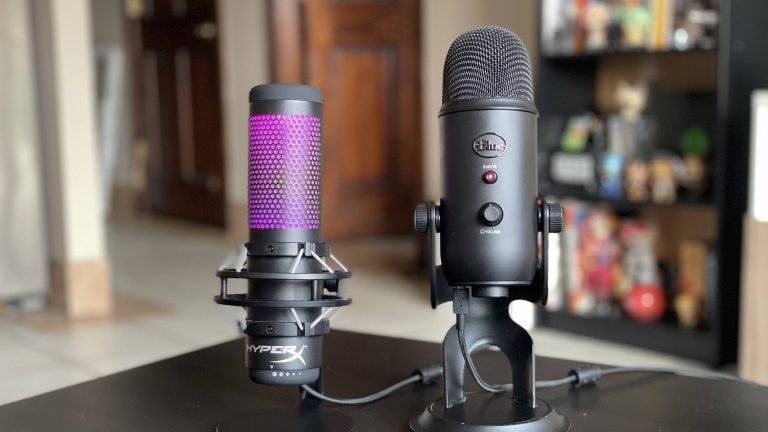
HyperX QuadCast vs QuadCast S: Which USB Microphone Should You Buy?
Table of Contents
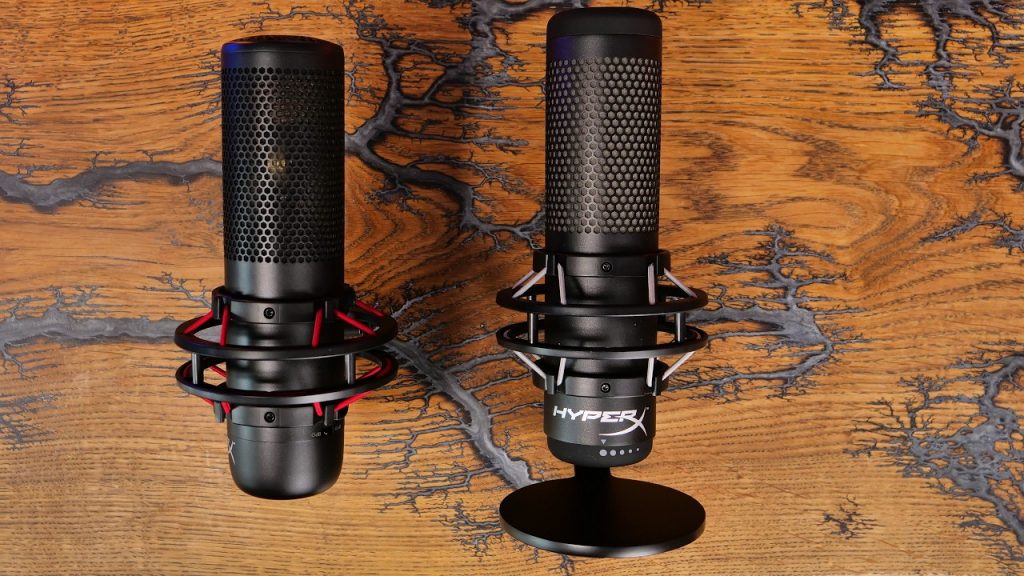
The HyperX QuadCast and HyperX QuadCast S look almost identical at first glance. They share the same iconic design, the same built-in shock mount, the same tap-to-mute sensor, and many of the same specifications. Because of that, many buyers assume the two microphones perform exactly the same and that the only difference is RGB lighting.
The reality is a little more nuanced. While the QuadCast S is essentially an upgraded version of the original QuadCast, the differences go beyond colorful lighting effects. There are changes in connectivity, software integration, and overall user experience that may make one model a better fit depending on how you stream, record podcasts, or create content.
If you’re trying to decide between the HyperX QuadCast vs QuadCast S, this guide breaks down the real-world differences.
Quick Verdict
For most people, the QuadCast remains the better value purchase if both microphones are available at significantly different prices. Sound quality is extremely similar, and many listeners would struggle to tell them apart in a blind recording test.
The QuadCast S becomes the stronger choice when the price gap is relatively small. The customizable RGB lighting, USB-C connectivity, and HyperX NGENUITY integration create a more modern experience that appeals to streamers and content creators who care about aesthetics and customization.
If audio quality alone determines your decision, you can confidently choose whichever model is cheaper.
HyperX QuadCast vs QuadCast S Specifications
On paper, these microphones share almost everything that made the QuadCast popular among streamers and podcasters.
Both are USB condenser microphones featuring four selectable polar patterns: cardioid, omnidirectional, bidirectional, and stereo. Both include a built-in anti-vibration shock mount that reduces desk noise and accidental bumps. Both feature a convenient tap-to-mute sensor and a 3.5mm headphone jack for real-time monitoring.
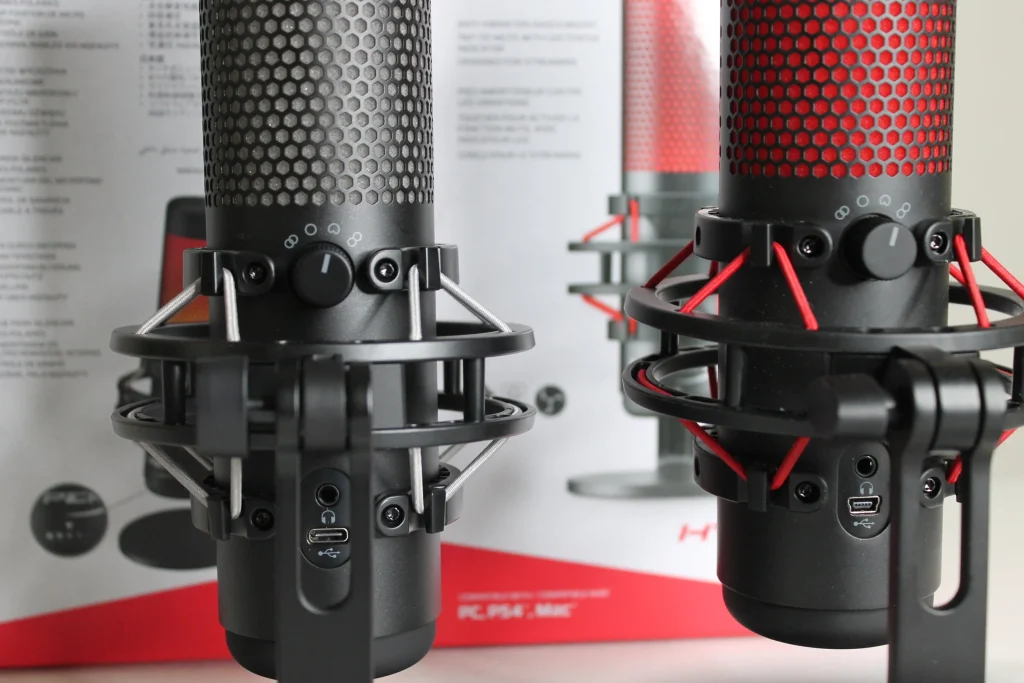
The primary hardware difference is connectivity. The original QuadCast uses a micro-USB connection, while the QuadCast S upgrades to USB-C. The QuadCast S also adds dynamic RGB lighting that can be customized through HyperX NGENUITY software. The original QuadCast uses static red illumination that cannot be customized.
In terms of frequency response, sensitivity, and recording capabilities, they are extremely close. Neither microphone offers a dramatic technical advantage over the other. This is why buyers should focus less on specifications and more on how the microphones perform during actual content creation.
Who Each Mic Is For
Who Should Buy the HyperX QuadCast?
The original QuadCast remains one of the easiest USB microphones to recommend to budget-conscious creators.
If your goal is simply to produce clean audio for streaming, Discord calls, gaming, Zoom meetings, YouTube videos, or podcasting, the original model still delivers excellent performance. The built-in shock mount reduces unwanted desk vibrations, the gain control is simple to adjust, and the tap-to-mute function remains one of the most convenient mute systems available on any USB microphone.
Many creators actually prefer the simpler approach. There’s no software to manage, no RGB profiles to configure, and fewer settings competing for attention. For someone building a practical streaming or recording setup, the original QuadCast often provides everything needed without paying extra for visual features.
Who Should Buy the HyperX QuadCast S?
The QuadCast S is designed for creators who care about both audio and presentation.
Modern streaming has become increasingly visual. Twitch, YouTube Live, Kick, and TikTok creators frequently invest in RGB lighting, themed setups, and coordinated aesthetics that help their channels stand out. The customizable lighting on the QuadCast S integrates naturally into those environments. Through HyperX NGENUITY software, users can create lighting profiles that match keyboards, mice, PC cases, and room lighting.
The USB-C connection is another meaningful upgrade. While it doesn’t improve sound quality, it aligns with modern devices and generally feels more durable and future-proof. If you stream regularly and your microphone remains visible on camera, the QuadCast S often feels like the more complete package.
Real Use Case Performance
Streaming Performance
Streaming is where both microphones excel. The cardioid pattern isolates your voice effectively while reducing much of the surrounding room noise. Neither microphone completely eliminates keyboard sounds or loud background activity, but both perform well enough for typical gaming environments.
For Twitch streamers, the most important factor is consistency. Viewers care less about ultra-professional studio quality and more about clear, understandable communication. Both microphones deliver that comfortably. The tap-to-mute sensor becomes particularly useful during live broadcasts. Instead of fumbling for keyboard shortcuts or software controls, streamers can instantly mute themselves with a quick touch.
In OBS, the microphones respond similarly to common filters such as noise suppression, compressor, limiter, and noise gate settings. Most streamers will achieve nearly identical results regardless of which model they choose. The biggest streaming advantage of the QuadCast S is visual appeal. RGB lighting looks excellent on camera and contributes to a polished setup.
Podcasting Performance
Podcasting places greater emphasis on voice quality than streaming. Fortunately, both microphones perform surprisingly well for USB condensers. Speech sounds clear, detailed, and naturally present. The microphones capture enough vocal detail to create professional-sounding podcasts without requiring expensive XLR equipment.
The built-in headphone monitoring is particularly valuable during podcast recording because it allows hosts to hear themselves in real time without noticeable latency. This helps maintain consistent speaking volume and microphone technique.
For solo podcasts, interviews, and conversational shows, either microphone is capable of producing publishable audio. Most listeners consuming content through smartphones, earbuds, or car speakers would struggle to identify which model was used. The deciding factor usually comes down to budget rather than audio quality.
Vocals and Voice Recording
Voice recording highlights the strengths and weaknesses of both microphones. The microphones capture strong vocal detail and maintain good clarity throughout the midrange frequencies where most speech exists. Male voices tend to sound full and warm, while female voices generally come across as crisp and articulate.
However, as condenser microphones, both models are relatively sensitive. They can pick up room reflections, air conditioning noise, keyboard clicks, and environmental sounds more easily than dynamic microphones.
For singing and vocal recording, both microphones perform competently for demos, YouTube covers, and casual music production. Serious music creators may eventually outgrow them and move toward dedicated studio microphones, but beginners and intermediate users can achieve impressive results.
Sound Profile Breakdown
How the QuadCast Sounds
The original QuadCast has a sound signature that many creators describe as warm and approachable. Voices feel slightly rounded and forgiving. Harsh frequencies are generally controlled well, making it easier to produce pleasant recordings without extensive equalization.
This forgiving nature is one reason the microphone became so popular among new streamers. It tends to make average recording environments sound better than they actually are. For gaming commentary, podcasts, and live streams, the QuadCast consistently produces a polished result with minimal effort.
How the QuadCast S Sounds
The QuadCast S sounds remarkably similar. Many side-by-side tests reveal only subtle differences. Some users perceive slightly improved clarity or brightness, while others report virtually identical performance.
In practice, any differences are small enough that room acoustics, microphone positioning, and post-processing settings have a much larger impact on the final recording. A properly positioned QuadCast will often outperform a poorly positioned QuadCast S despite the newer model’s upgrades.
Can Most People Hear the Difference?
Probably not. In blind listening tests, most casual listeners cannot reliably distinguish between recordings made with the QuadCast and QuadCast S.
The microphones share the same fundamental design philosophy and capture characteristics. Differences become difficult to detect once audio passes through streaming compression, podcast hosting platforms, Discord processing, or YouTube encoding. For most buyers, sound quality should not be the deciding factor.
Setup and Ease of Use
Software Experience
The original QuadCast takes a plug-and-play approach. Connect it to your computer, select it as your input device, adjust the gain, and start recording.
The QuadCast S introduces HyperX NGENUITY software, allowing users to customize RGB lighting effects and profiles. The software experience is generally straightforward, though some users prefer avoiding additional applications entirely. If you enjoy customizing your setup, the software adds meaningful flexibility. If you simply want to record audio, it may not provide significant value.
OBS and Streaming Setup
Both microphones integrate easily with OBS. Audio routing, filters, gain staging, and monitoring work essentially the same way. New streamers can achieve professional results without extensive technical knowledge.
Because the microphones include onboard controls, many adjustments can be made directly on the hardware rather than through software menus. This simplicity remains one of the strongest selling points of both models.
Daily Usability
Day-to-day use is excellent across both microphones. The tap-to-mute sensor remains one of the best convenience features in the USB microphone category. The built-in shock mount reduces vibration noise effectively, and the gain knob is easy to access during live recordings.
The QuadCast S gains a small advantage thanks to USB-C. Modern cables are easier to replace and integrate better with contemporary devices.
Value for Money
The original QuadCast wins whenever there is a significant price difference. If the QuadCast costs $30 to $50 less than the QuadCast S, it becomes difficult to justify paying extra solely for RGB lighting and USB-C connectivity. Because sound quality remains so similar, budget-conscious buyers usually receive better value from the original model.
The QuadCast S becomes attractive when pricing narrows. A small premium often makes sense because you’re receiving improved connectivity, customizable RGB lighting, software support, and a more modern design. For streamers who keep their microphone visible on camera, those additions may contribute directly to channel presentation and viewer perception. Over several years of use, the added cost can feel relatively minor.
Final Verdict
Best for Streamers
The QuadCast S takes the win for streamers. The RGB lighting enhances on-camera appearance, the USB-C connection feels more modern, and the customization options fit naturally into contemporary streaming setups.
Best for Podcasters
The original QuadCast earns a slight edge for podcasting. Podcast audiences care about audio quality, and the two microphones sound nearly identical. If the original model costs less, podcasters gain little from the extra features offered by the QuadCast S.
Best Overall Value
The HyperX QuadCast remains the overall value champion. For pure audio performance, it delivers nearly everything the QuadCast S offers at a potentially lower cost. If pricing is close, choose the QuadCast S. If the original QuadCast is substantially cheaper, it’s usually the smarter purchase.
Frequently Asked Questions
Does the QuadCast S sound better than the QuadCast?
Not significantly. While some users report slightly improved clarity, most listeners cannot reliably distinguish between the two microphones in real-world recordings. Room acoustics, microphone placement, and post-processing have a far greater impact on sound quality than the differences between these models.
Is the RGB lighting on the QuadCast S worth paying extra for?
That depends on how visible the microphone will be. Streamers who feature their microphone on camera often appreciate the customizable RGB effects because they help create a more professional-looking setup. Podcasters and off-camera creators may find little practical value in the lighting.
Is the HyperX QuadCast still worth buying?
Yes. Despite being the older model, the QuadCast remains one of the strongest USB microphone options for streaming, podcasting, gaming, and content creation. Its sound quality continues to compete well with newer alternatives.
Which microphone is better for OBS?
Both microphones perform equally well with OBS. They support the same filtering techniques, gain adjustments, monitoring features, and recording workflows. OBS users should base their decision on pricing and aesthetics rather than software compatibility.
Is the QuadCast S good for podcasting?
Absolutely. The QuadCast S produces clear, detailed vocal recordings suitable for professional podcasts. It offers the same strong recording foundation as the original QuadCast while adding modern connectivity and customization features.
Should beginners buy the QuadCast or QuadCast S?
Most beginners should buy whichever model offers the better deal. Both microphones are easy to use, require minimal setup, and provide excellent audio quality. The QuadCast S becomes more attractive if RGB lighting and USB-C connectivity matter to your setup.