
Blue Yeti vs QuadCast for Streaming: Which USB Mic Is Better?
Table of Contents
When comparing the Blue Yeti vs QuadCast for streaming, the biggest difference isn’t simply which microphone sounds better. Both are capable USB condenser microphones with multiple polar patterns, onboard controls, and headphone monitoring. The better choice depends on how you plan to use the microphone and how much convenience you want built into the hardware.
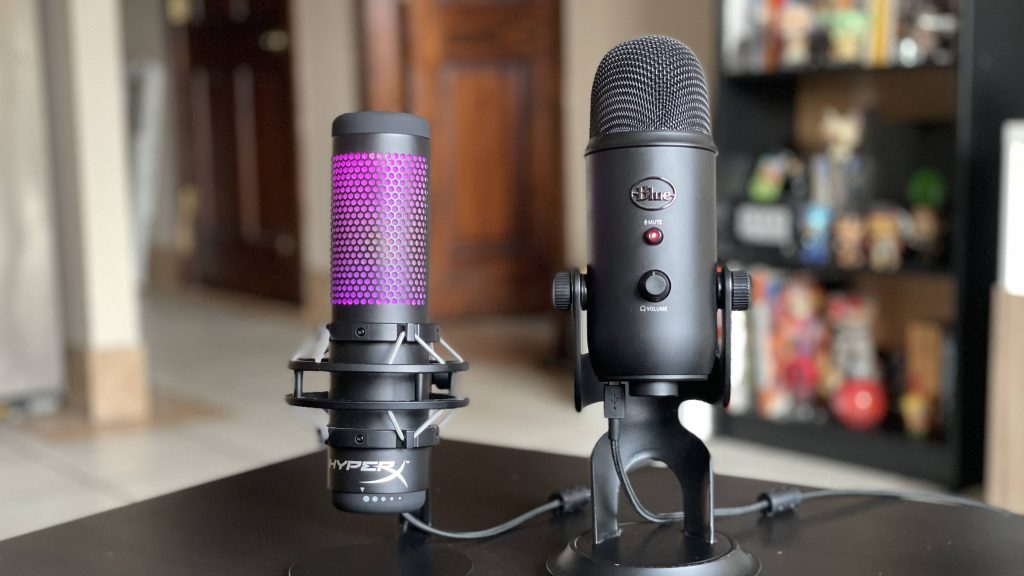
The Blue Yeti is a strong all-around recording microphone. It works well for streaming, podcasts, voiceovers, vocals, and other desktop recording tasks, especially when you want flexibility from one mic. The HyperX QuadCast is more clearly designed around streamers and gamers. Its built-in shock mount, tap-to-mute sensor, and visual mute indicator make it particularly convenient during live broadcasts.
For streaming alone, the QuadCast is generally the easier recommendation. For creators who want one microphone for several types of recording, the Blue Yeti remains highly competitive.
Who Each Mic Is For
The Blue Yeti and HyperX QuadCast overlap heavily in capability, but they target slightly different types of users.
Who Should Choose the Blue Yeti?
The Blue Yeti makes the most sense for creators who want one USB microphone that can handle several jobs. It offers four polar patterns, including cardioid, bidirectional, omnidirectional, and stereo. That gives you more ways to use the microphone beyond a conventional gaming setup.
A streamer might use cardioid mode for solo commentary, switch to bidirectional mode for a face-to-face interview, or experiment with stereo recording for music and instruments. The Yeti is particularly appealing if you create different types of content rather than streaming exclusively. It can serve as your gaming microphone during the week, your podcast mic on the weekend, and a basic vocal or instrument microphone when you need to record something else.
It also suits users who expect to expand their setup over time. You can start with the included desktop stand and later add a boom arm, shock mount, or other accessories.
Who Should Choose the HyperX QuadCast?
The QuadCast is better suited to creators whose setup revolves primarily around gaming, streaming, Discord, and live content. Its biggest advantage is that several streamer-friendly features are already integrated into the microphone.
The built-in anti-vibration shock mount helps reduce mechanical vibrations traveling through your desk or microphone stand. The tap-to-mute sensor lets you silence the microphone without pressing a traditional mechanical button, while the lighting gives you an immediate visual indication of whether you’re muted. Those features don’t fundamentally improve the microphone’s recording resolution, but they make everyday streaming easier.
If you regularly need to mute yourself during broadcasts, move around at your desk, type aggressively, or simply want a microphone that feels ready for streaming immediately after setup, the QuadCast has a clear advantage.
Real Use Case Performance
Specifications only tell part of the story. How these microphones perform during actual streaming, podcasting, and vocal recording is more useful than comparing numbers in isolation.
Streaming
For streaming, the HyperX QuadCast has the practical advantage. Both microphones can capture detailed spoken commentary, and both work well when positioned correctly. The QuadCast simply packages more streaming-specific hardware into the standard setup.
Its integrated shock mount is particularly useful on gaming desks. Keyboard input, controller movements, mouse adjustments, and accidental desk bumps can create vibrations that travel through a stand and into a microphone. The shock mount helps isolate the QuadCast from some of that mechanical energy.
Its tap-to-mute control is another meaningful advantage during live broadcasts. If you need to cough, talk to someone off-camera, or temporarily mute your stream, you can tap the top of the microphone instead of searching for a software control or pressing a conventional button mounted on the mic. The Blue Yeti also has a physical mute control, so it’s far from inconvenient. The QuadCast implementation simply feels more purpose-built for live use.
Sound quality between the two is close enough that microphone placement will often matter more than the microphone you choose. Both are sensitive condenser microphones. If either mic is sitting far from your mouth with the gain turned high, it can pick up keyboard noise, PC fans, air conditioning, and reflections from the room.
For the best streaming performance, use cardioid mode, keep the microphone relatively close to your mouth, and lower the gain accordingly. A properly positioned Blue Yeti will usually sound better than a poorly positioned QuadCast, and the reverse is equally true.
Podcasting
For podcasting, the Blue Yeti becomes more competitive and may be the better fit for creators who frequently change recording setups. Both microphones offer multiple pickup patterns, which gives them flexibility beyond basic solo recording. For a one-person podcast, cardioid mode is typically the best option because it focuses primarily on sound arriving from the front of the microphone.
If two people are sitting across from each other and sharing one microphone, bidirectional mode can capture sound from the front and rear. Omnidirectional mode can also be useful when several people are positioned around a single microphone, although separate microphones generally provide better control when recording multiple speakers.
The Blue Yeti’s long-standing reputation as a multipurpose desktop recording microphone makes it especially comfortable in these mixed-use situations. Its sound can work particularly well for spoken-word content when the mic is positioned close enough to capture the speaker clearly without excessive room noise.
The QuadCast is also fully capable of podcasting. Its shock mount may even be beneficial if the speakers are using a table that gets bumped frequently. However, its gaming-focused design provides fewer advantages in a controlled podcasting environment than it does during a livestream.
If your microphone will spend equal time on podcasts and streams, the choice becomes much closer.
Vocals
For casual vocal recording, both microphones can deliver usable results, but the Blue Yeti is usually the more natural choice. The Yeti was designed as a multipurpose recording microphone rather than exclusively as a gaming peripheral. Its multiple pickup patterns and condenser sensitivity make it suitable for vocals, acoustic instruments, voiceovers, and other recording situations.
That doesn’t make it a substitute for a professional studio microphone and audio interface, but it provides enough flexibility for demos, covers, social media recordings, scratch vocals, and home content creation.
The QuadCast can record vocals as well. Its condenser capsules capture plenty of detail, and its frequency response covers the full range needed for normal vocal recording. The difference is more about workflow and positioning than raw capability.
The QuadCast’s streamer-style shock mount and lighting don’t add much to a vocal session. The Yeti’s more neutral multipurpose design feels better suited to someone who regularly moves between spoken content and music recording.
For singers who only occasionally record vocals and mainly stream games, the QuadCast still makes sense. For creators who want vocals to be a significant part of their workload, the Yeti is the stronger all-around option.
Sound Profile Breakdown
The Blue Yeti and QuadCast aren’t dramatically different microphones from a technical perspective. Both use condenser capsules and are designed to capture detailed audio directly over USB. Their real-world sound differences are subtle compared with the effects of microphone distance, gain, room acoustics, and processing.
Blue Yeti Sound Profile
The Blue Yeti tends to produce a full, detailed vocal presentation that works well for spoken content. Its sensitivity helps capture smaller nuances in the voice, which can make speech sound rich and present when the microphone is positioned correctly.
That sensitivity can also become a disadvantage. If you’re sitting too far away, the Yeti may capture a surprising amount of your environment. Keyboard clicks, room reflections, PC fans, and air-conditioning noise can become more noticeable when users compensate for poor placement by increasing gain.
The Yeti therefore rewards proper microphone technique. Keeping it close to your mouth allows you to lower the gain while maintaining a strong vocal signal. That reduces the relative level of unwanted room sound and usually produces a cleaner recording. Its fuller presentation can also work nicely for podcasting and vocal recording, particularly if you prefer a voice that sounds substantial rather than extremely lean or aggressive.
HyperX QuadCast Sound Profile
The QuadCast also delivers a clear, detailed condenser sound, but its presentation is particularly effective for speech-heavy gaming and streaming content. Voices remain easy to understand when mixed with gameplay, Discord conversations, alerts, and background music.
Like the Yeti, however, it shouldn’t be confused with a noise-rejecting broadcast microphone. Its shock mount reduces physical vibration. It doesn’t stop airborne keyboard noise from reaching the capsule. A mechanical keyboard sitting next to the microphone can still be clearly audible if the QuadCast is positioned too far from your mouth or the gain is unnecessarily high.
This distinction matters because the QuadCast’s gamer-oriented appearance can create the impression that it automatically handles noisy rooms better. In practice, both microphones require sensible positioning.
Which Sounds Better?
There isn’t a decisive winner based on sound quality alone. The Yeti can sound slightly fuller and is particularly versatile for voices and general recording. The QuadCast delivers clean, articulate speech that fits naturally into gaming and livestream mixes.
For most viewers listening through headphones, laptop speakers, phones, or compressed streaming audio, proper microphone placement will create a much larger difference than switching from one of these microphones to the other.
If sound is your only consideration, the choice is close. If sound plus streaming workflow matters, the QuadCast gains the advantage.
Setup & Ease of Use
Both microphones are considerably easier to set up than an XLR recording system. You don’t need a dedicated audio interface, external microphone preamp, or complicated signal chain. Connect the microphone through USB, select it as your input device, and configure it in OBS, Streamlabs, Discord, or your preferred recording software. That simplicity makes both good choices for first-time creators.
Blue Yeti Setup
The Blue Yeti includes a sturdy desktop stand and straightforward physical controls. You can adjust microphone gain, switch pickup patterns, mute the mic, and connect headphones for direct monitoring. For a basic desktop setup, that may be all you need.
The main limitation becomes apparent once you start optimizing your microphone position. Leaving the Yeti sitting directly on the desk may place it farther from your mouth than ideal, particularly if you’re trying to keep it below your monitor or outside the camera frame.
A boom arm can significantly improve the setup because it allows you to position the mic closer while keeping it out of the way. Adding a shock mount can further reduce vibrations transmitted through the desk. The Yeti therefore works easily out of the box but benefits noticeably from accessories once you become more serious about streaming.
QuadCast Setup
The QuadCast has the edge in out-of-the-box convenience. Its integrated anti-vibration shock mount eliminates one accessory that many streamers would otherwise consider adding. The tap-to-mute control also requires almost no learning curve. Tap the microphone to mute it, and the visual indicator makes its status obvious.
Onboard gain adjustment means you can quickly respond if your input is too hot or too quiet. The headphone connection provides direct monitoring, allowing you to hear what the microphone is capturing before you start adjusting software filters. These features make the QuadCast particularly beginner-friendly.
You can still add a boom arm if you want better positioning, but the microphone already includes more of the hardware that streamers typically want.
Setting Either Mic Up Correctly
Regardless of which microphone you choose, avoid using software processing to compensate for poor physical setup. Start with cardioid mode for solo streaming. Position the microphone reasonably close to your mouth, preferably slightly off-axis, so you’re not directing every burst of air straight into the capsule. Then lower the gain until your voice remains strong without dramatically amplifying the room.
Record yourself typing, speaking normally, and moving around your desk. Listen to that recording before adding noise suppression, compression, an expander, or a noise gate. Software processing works best when you’re improving an already clean signal. It becomes much less effective when you’re trying to rescue a microphone sitting several feet away with excessive gain.
Value for Money
Value depends on what you would otherwise need to buy after purchasing the microphone.
The Blue Yeti offers strong value as a versatile USB microphone because it can handle streaming, podcasting, voiceovers, video calls, music, and other recording situations without additional audio hardware. If you plan to use one microphone for several different jobs, that flexibility can make the Yeti the better long-term purchase.
However, streamers should factor accessories into the comparison. You may eventually want a boom arm, shock mount, or pop filter to create a more optimized Yeti streaming setup. Those additions increase the total cost.
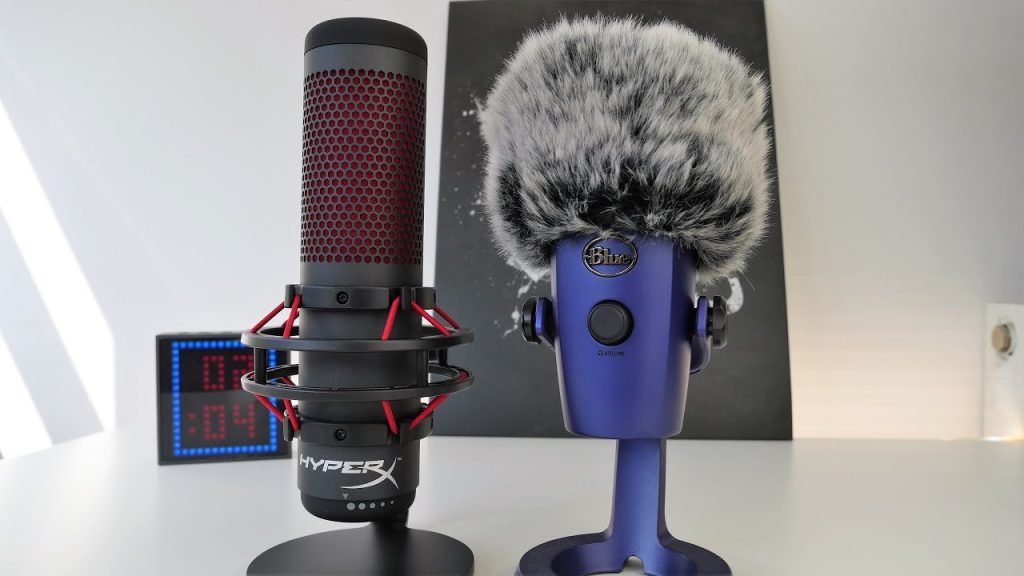
The QuadCast includes more of that functionality from the beginning. Its built-in shock mount and integrated mute system mean you can create a capable streaming setup without immediately purchasing additional hardware. That gives it strong value specifically for gaming and livestreaming.
If both microphones are available at similar prices, the QuadCast generally gives streamers more useful hardware for the money. If the Yeti is substantially cheaper, the equation changes. A discounted Yeti can be an excellent purchase, particularly if you already own a boom arm or aren’t concerned about desk vibration.
You should also pay attention to which QuadCast you’re comparing. The original QuadCast, QuadCast S, and newer QuadCast 2 aren’t identical products. The QuadCast S focuses heavily on customizable RGB aesthetics, while the QuadCast 2 raises recording capability to 24-bit/96 kHz and introduces updated controls.
If you’re buying new, compare the exact models and prices rather than treating every microphone carrying the QuadCast name as equivalent.
Final Verdict
The Blue Yeti vs QuadCast for streaming comparison has a relatively clear winner when streaming is your main priority: the HyperX QuadCast. Its sound quality is strong enough for professional-sounding streams when configured correctly, but its bigger advantage is usability. The integrated shock mount, tap-to-mute sensor, obvious microphone-status indicator, gain control, and headphone monitoring make it particularly well adapted to livestreaming and gaming.
Choose the HyperX QuadCast if streaming and gaming are your primary activities. It’s the stronger out-of-the-box streaming package and requires fewer accessories to create a polished desktop setup.
Choose the Blue Yeti if versatility matters more. It’s an excellent choice for someone who streams but also records podcasts, voiceovers, vocals, instruments, interviews, or other types of content. Its multiple polar patterns and flexible recording capabilities make it easier to justify as a general-purpose USB microphone.
For podcasting, the Blue Yeti gets a slight edge because of its multipurpose recording strengths. For casual vocals and broader content creation, the Blue Yeti is also the better fit. For pure streaming convenience, the HyperX QuadCast wins.
Neither microphone automatically solves background-noise problems. Both are sensitive condenser microphones, so microphone placement, gain, room acoustics, and processing remain critical. Put either mic close to your mouth, use cardioid mode for solo streams, keep the gain controlled, and only then fine-tune the signal in OBS or your recording software.
For most people searching specifically for the best option in the Blue Yeti vs QuadCast for streaming matchup, the QuadCast is the better choice. The Yeti remains the more flexible microphone, but the QuadCast is the one whose features most directly address the realities of live streaming.


