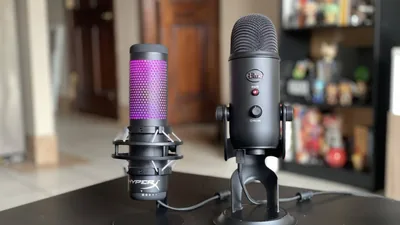
Blue Yeti vs HyperX QuadCast: Which USB Microphone Is Better?
USB microphones have become the default starting point for streamers, podcasters, YouTubers, and online creators. Among the dozens of options available, two models dominate beginner and mid-range creator setups more than almost anything else: the Blue Yeti and the HyperX QuadCast.
There’s a reason this comparison shows up everywhere. Both microphones target nearly the exact same audience. They’re USB condenser microphones designed for creators who want better audio without dealing with XLR interfaces, mixers, or complicated audio chains. They both offer multiple pickup patterns, onboard controls, real-time monitoring, and plug-and-play functionality. But once you move beyond the spec sheet, the differences become more obvious.
The Blue Yeti leans toward versatility and fuller vocal capture. The HyperX QuadCast focuses more aggressively on streaming usability, cleaner aesthetics, vibration isolation, and simpler day-to-day operation. Depending on your setup, your room, and your voice, one can absolutely outperform the other.
This comparison focuses on real-world use rather than marketing claims. Instead of repeating box specs, we’re looking at how these microphones actually behave during streaming, podcasting, Discord calls, voiceovers, gaming sessions, and content creation.
Who Each Mic Is For
Who Should Buy the Blue Yeti
The Blue Yeti appeals most to users who want flexibility. It’s one of the few mainstream USB microphones that comfortably handles multiple types of recording without forcing you into a narrow use case. If you switch between solo podcasting, interviews, voiceovers, casual streaming, and even occasional music recording, the Yeti adapts surprisingly well.
Its strongest characteristic is its fuller sound profile. Voices tend to sound thicker and more rounded on the Blue Yeti, especially lower male voices or creators aiming for a warmer broadcast-style tone. That’s one reason the mic became so popular with early YouTubers and podcasters.
The additional pickup patterns also matter more than many people realize. Cardioid mode works best for solo recording, but omnidirectional and bidirectional modes allow the Yeti to handle table interviews or multi-person conversations better than many gaming-focused microphones.
That flexibility comes with tradeoffs. The Blue Yeti is extremely sensitive. In untreated rooms, it can capture keyboard clicks, chair squeaks, fan noise, and echo far more aggressively than beginners expect. Users who don’t understand gain control often end up with harsh or noisy recordings.
The Yeti works best for creators who:
- Want richer vocal depth
- Record multiple types of content
- May eventually learn EQ and audio processing
- Value versatility over simplicity
Who Should Buy the HyperX QuadCast
The HyperX QuadCast targets streamers far more directly. Almost every part of its design feels optimized for Twitch, Discord, gaming desks, and creator setups.
The built-in shock mount is one of the biggest practical advantages. Many new streamers underestimate how much desk vibrations affect audio quality. Mechanical keyboards, desk bumps, mouse movement, and controller taps can all transfer directly into microphones. The QuadCast does a significantly better job isolating those vibrations out of the box.
Its sound profile also tends to be cleaner and more focused immediately after setup. While the Blue Yeti can sound richer, the QuadCast often requires less tweaking for understandable stream audio. The tap-to-mute sensor is another genuinely useful feature. During live streams or Discord sessions, being able to instantly mute the microphone without hunting for buttons is surprisingly valuable.
The QuadCast works especially well for:
- Twitch streamers
- Discord-heavy gamers
- Beginner creators
- RGB-focused gaming setups
- Users in noisier environments
Where it falls slightly behind the Yeti is vocal richness and versatility. The QuadCast prioritizes clarity and simplicity more than warmth and tonal depth.
Which Mic Is Better for Beginners?
For complete beginners, the HyperX QuadCast is usually easier to manage. That doesn’t necessarily mean it’s the better microphone overall. It means beginners are less likely to run into problems immediately.
The Blue Yeti’s sensitivity becomes difficult when users don’t yet understand:
- Microphone positioning
- Gain staging
- Room acoustics
- OBS filters
- Compression
- Noise gates
A poorly configured Blue Yeti can sound harsh, echo-heavy, or noisy very quickly.
The QuadCast tends to produce cleaner results with less effort. Its integrated shock mount reduces common beginner mistakes, and its vocal presentation is easier to fit into gaming or streaming environments. For someone who wants a simple setup that works immediately, the QuadCast usually creates fewer frustrations.
Blue Yeti vs HyperX QuadCast for Streaming
Voice Presence and Stream Clarity
Streaming microphones need to do more than sound “good.” They need to cut through gameplay audio, Discord conversations, alerts, music, and stream compression.
The Blue Yeti produces a thicker vocal tone with more low-end body. This creates a stronger “radio voice” effect when positioned correctly. For streamers with deeper voices, this can sound particularly impressive. However, that fuller capture can also become muddy if the microphone is too far away or if the room has poor acoustics.
The HyperX QuadCast approaches vocal capture differently. It emphasizes clarity and articulation more aggressively. Vocals tend to sound slightly brighter and more forward. This helps voices remain understandable during chaotic gameplay or louder stream mixes.
For competitive gaming streams, the QuadCast’s clarity often translates better immediately. For personality-driven streams or commentary-heavy content, many creators prefer the Blue Yeti’s richer presentation.
Background Noise and Keyboard Pickup
This is where the comparison becomes more complicated. Both microphones are condenser microphones, which means both are naturally sensitive. Neither behaves like a broadcast dynamic microphone such as the Shure SM7B or Electro-Voice RE20. Still, the Blue Yeti tends to capture more environmental detail overall. That includes:
- Keyboard clicks
- Mouse movement
- Room echo
- PC fans
- Air conditioning
- Desk vibrations
In ideal recording spaces, this extra detail can sound excellent. In average bedrooms or gaming rooms, it can become a problem.
The QuadCast handles desk vibration better because of its shock mount. That alone gives it a noticeable advantage for gaming setups. Users with loud mechanical keyboards often report cleaner stream audio from the QuadCast because less physical vibration transfers into the capsule.
OBS and Discord Performance
Both microphones work seamlessly with OBS, Streamlabs, Discord, Zoom, and most modern recording software. The bigger difference comes from how much processing each microphone needs.
The Blue Yeti often benefits heavily from:
- Noise suppression
- EQ
- Compression
- Noise gating
Without those adjustments, its sensitivity can overwhelm beginner setups.
The QuadCast usually needs less correction initially. Voices tend to sit in the mix more naturally without extensive tuning. That doesn’t mean the QuadCast is technically superior. It simply means it’s tuned more aggressively toward modern streaming environments.
Desk Vibrations and Shock Isolation
The QuadCast wins this category fairly decisively. The built-in shock mount isn’t just visual decoration. It materially improves stream audio by reducing impact noise and vibration transfer.
The Blue Yeti, when placed directly on a desk stand, can pick up:
- Desk taps
- Controller movement
- Typing vibrations
- Accidental bumps
Many Yeti owners eventually buy boom arms, external shock mounts, and vibration pads.
The QuadCast includes much of that protection immediately. For streamers using compact desks or energetic gaming setups, this advantage becomes very noticeable.
Blue Yeti vs HyperX QuadCast for Podcasting
Podcast Vocal Depth and Warmth
Podcast listeners tend to care more about warmth and vocal texture than stream viewers do. This is where the Blue Yeti performs particularly well. The Yeti captures more low-end depth and vocal fullness, especially for spoken-word content. Many podcasters prefer this because it creates a more “broadcast” presentation. Voices sound larger and more intimate when the microphone is positioned correctly.
The QuadCast still sounds good for podcasting, but it leans cleaner and brighter. Some creators appreciate that sharper articulation, while others feel it sounds slightly thinner compared to the Yeti. For conversational podcasts focused heavily on vocal personality, the Blue Yeti usually sounds more natural and substantial.
Single-Person vs Multi-Person Recording
This is another area where the Yeti’s versatility matters. Its multiple pickup patterns make it easier to handle:
- Interviews
- Table discussions
- Dual-host podcasts
- Ambient recording
The omnidirectional and bidirectional modes add flexibility that many streaming microphones lack.
The QuadCast also includes multiple patterns, but its tuning and design feel more centered around single-user streaming environments.
For solo podcasts, both work well. For more experimental or collaborative recording setups, the Blue Yeti usually adapts better.
Monitoring and Long Recording Sessions
Both microphones include headphone monitoring, which is essential for podcast recording. Latency-free monitoring helps podcasters:
- Hear clipping immediately
- Control vocal volume
- Maintain consistent mic distance
- Reduce accidental peaking
The Blue Yeti’s headphone amplification is slightly stronger overall, which some users prefer during extended sessions. The QuadCast’s controls are simpler and more accessible during live recording. This category largely comes down to workflow preference rather than outright superiority.
Blue Yeti vs HyperX QuadCast for Vocals and Content Creation
YouTube Voiceovers
Voiceovers require clarity, consistency, and tonal control. The Blue Yeti excels when creators want cinematic or fuller narration. Educational videos, documentary-style content, and commentary channels often benefit from its richer vocal reproduction.
The QuadCast works extremely well for faster-paced creator content:
- Gaming videos
- Reaction channels
- Livestream highlights
- Tutorials
- Discord compilations
Its brighter vocal emphasis helps maintain intelligibility even after YouTube compression.
Music and Singing Performance
Neither microphone is truly designed as a professional music recording solution, but the Blue Yeti generally performs better for casual vocal recording. Its fuller frequency response captures more nuance and body in singing voices.
The QuadCast prioritizes spoken-word clarity more aggressively, which can make sung vocals sound slightly less natural. Creators recording acoustic demos or occasional vocals will usually get more satisfying results from the Yeti.
Dynamic Range and Vocal Texture
The Yeti captures more vocal texture overall. That includes:
- Subtle breaths
- Low-end resonance
- Vocal layering
- Tonal complexity
The downside is that it also captures more flaws in untreated rooms. The QuadCast smooths some of that detail into a cleaner and more controlled presentation. One sounds more expansive. The other sounds more focused.
Sound Profile Breakdown
How the Blue Yeti Sounds
The Blue Yeti has a warm and relatively bass-forward sound signature. Voices feel fuller, heavier, and more rounded. Lower frequencies receive more presence, which creates a more traditional broadcast-style tone. For deeper voices, this often sounds excellent immediately. However, that added warmth can become muddy if:
- The mic is too far away
- Gain is too high
- The room has an echo
- The voice already contains heavy low frequencies
Proper positioning matters significantly.
How the HyperX QuadCast Sounds
The QuadCast sounds brighter and cleaner. There’s less exaggerated low-end emphasis, which helps vocals remain articulate in gaming and streaming mixes. This tuning helps beginners because it reduces muddiness without requiring EQ adjustments.
The tradeoff is slightly less vocal richness. Some users describe the QuadCast as more “processed” sounding out of the box, while the Yeti sounds more natural but less controlled.
Which Mic Handles Deep Voices Better?
The Blue Yeti generally performs better for deep voices. Its fuller low-end response complements lower vocal ranges naturally, especially for podcasting and commentary.
The QuadCast can still sound good with deep voices, but some users find it slightly thinner without EQ adjustments.
Which Mic Needs Less EQ?
The HyperX QuadCast usually requires less immediate tuning. Many beginner streamers can plug it in, apply a basic noise gate, and achieve solid results quickly.
The Blue Yeti often benefits more from EQ and processing to manage low-end buildup, room noise, and excessive sensitivity. Advanced users may prefer the Yeti’s flexibility. Beginners usually appreciate the QuadCast’s simplicity.
Setup and Ease of Use
Pickup Patterns Explained
Both microphones include multiple pickup patterns, including:
- Cardioid
- Omnidirectional
- Bidirectional
- Stereo
For most creators, cardioid mode is the correct choice because it focuses primarily on the voice directly in front of the microphone.
The additional patterns mainly help with interviews, group recording, and room capture. But most streamers will rarely change modes after initial setup.
Gain Control and Monitoring
Both microphones include onboard gain controls and real-time headphone monitoring. However, beginners frequently misuse gain settings.
A common mistake is increasing gain too high while positioning the microphone too far away. This forces the microphone to amplify the room instead of primarily capturing the voice. Both microphones sound substantially better when positioned:
- 4–8 inches from the mouth
- slightly off-axis
- with moderate gain
The QuadCast’s controls feel slightly more intuitive for gaming setups.
Mounting and Boom Arm Compatibility
The Blue Yeti is physically heavier and bulkier. Some cheaper boom arms struggle to support it properly. The QuadCast is lighter and easier to position. Many creators eventually move both microphones onto boom arms because desk placement often increases vibration, keyboard noise, and inconsistent positioning.
RGB, Controls, and Physical Design
The QuadCast clearly targets gaming aesthetics more aggressively. Its RGB lighting integrates naturally into modern streaming setups, and the tap-to-mute feature is genuinely practical. The Blue Yeti looks more studio-oriented and minimal. This category comes down almost entirely to personal preference.
Background Noise and Room Acoustics
One of the biggest misconceptions surrounding USB microphones is that expensive automatically means forgiving. Condenser microphones are designed to capture detail. That detail includes both your voice and your environment. That’s why users moving from headset microphones are often shocked by how much room noise suddenly appears.
Both the Yeti and QuadCast will expose:
- Echo
- Hard walls
- Ceiling reflections
- Keyboard noise
- Fans
- Air conditioning
Room treatment matters more than many beginners realize.
Which Mic Works Better in Untreated Rooms?
The HyperX QuadCast generally performs better in untreated spaces. Its tuning and shock isolation help control some of the environmental chaos common in gaming setups.
The Blue Yeti can sound excellent in treated environments, but average bedrooms often cause it to sound overly sensitive. That doesn’t mean the Yeti is “bad.” It simply demands more environmental control.
Reducing Keyboard and Fan Noise
Both microphones benefit enormously from:
- Boom arm positioning
- Lower gain
- Noise gates
- Foam panels
- Proper mic placement
The biggest improvement usually comes from moving the microphone closer to the mouth while reducing gain. This improves the voice-to-room ratio dramatically.
Value for Money
Price Differences
Pricing changes frequently, but both microphones usually occupy similar mid-range USB microphone territory. The QuadCast sometimes costs slightly more because of RGB integration, shock mount, and gaming-focused features. The Yeti often delivers stronger raw recording flexibility for the money.
Included Features
The QuadCast includes more immediately practical streaming features:
- Shock mount
- Tap-to-mute
- RGB status lighting
The Blue Yeti emphasizes recording versatility instead.
Long-Term Upgrade Potential
The Blue Yeti arguably offers more long-term experimentation potential because its fuller capture responds well to advanced EQ and processing. Users who eventually learn compression, EQ, and audio treatment can extract impressive results from it. The QuadCast focuses more on accessible consistency.
Final Verdict
There isn’t a universal winner because the better microphone depends heavily on the environment and content style.
Choose the Blue Yeti if you:
- Prioritize vocal richness
- Want flexibility
- Plan to learn audio processing
- Record podcasts or voiceovers
Choose the HyperX QuadCast if you:
- Mainly stream or game
- Want easier setup
- Use a noisy desk setup
- Prefer cleaner plug-and-play audio
Frequently Asked Questions
Is the HyperX QuadCast better than the Blue Yeti?
For streaming and beginner gaming setups, many users will find the HyperX QuadCast easier to use. Its built-in shock mount, cleaner out-of-box tuning, and tap-to-mute feature fit modern streaming workflows extremely well.
However, the Blue Yeti often delivers richer vocal depth and greater versatility for podcasting and multi-purpose recording. The better option depends more on your environment and content style than pure specs.
Which microphone sounds better for streaming?
The QuadCast usually sounds cleaner for live streaming immediately after setup. It emphasizes vocal clarity and handles desk vibration better. The Blue Yeti can sound more impressive overall when properly tuned, but it requires better placement and room control.
Does the Blue Yeti pick up more background noise?
Yes, in many setups it does. The Blue Yeti is highly sensitive and captures a large amount of environmental detail. In untreated rooms, this can include keyboard clicks, fan noise, echo, and desk vibration. Proper gain staging and positioning help significantly.
Can you use the HyperX QuadCast for podcasting?
Absolutely. The QuadCast performs very well for podcasting, especially solo spoken-word content. The Blue Yeti usually sounds fuller and warmer, but the QuadCast still delivers clean and professional vocal clarity.
Is the Blue Yeti still worth buying?
Yes. Despite newer competitors entering the market, the Blue Yeti remains one of the most versatile USB microphones available. Its sound quality, pickup pattern flexibility, and vocal depth still make it a strong option for podcasting, voiceovers, and creator content.
Which mic is easier to set up with OBS?
The HyperX QuadCast is generally easier for beginners. It typically needs less EQ and less troubleshooting to produce clean stream audio. The Blue Yeti often benefits more from filters and tuning adjustments.